
Small habits that make the difference between “it works” and “participants love it”.
14.1 Setting up the room#
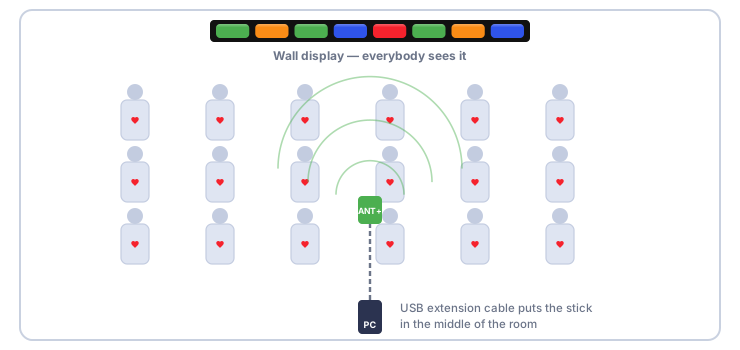
- The screen. Mount a TV or a projector where everybody can see it from their place — for a cycling studio, on the wall in front of the bikes. The more participants you have, the smaller each box becomes, so choose a large screen or a projector for big groups.
- The computer. Connect it by HDMI. In Windows set the display mode to Duplicate if the trainer wants to see the same picture on the laptop, or Extend if the trainer wants to keep working on the laptop screen. The live screen can be moved to the second display and switched to full screen.
- The receiver. Put the ANT+ stick on a short USB extension cable, in a central, elevated position with a clear line of sight to the participants. Use two sticks in a very large room (Antenna support).
- Power. Plug the computer in. Training screens keep the computer awake, but a flat battery ends the class.
- Quiet computer. Close other programs, especially those that show notifications or start updates in the middle of a class. Turn off Windows notifications while you train (Focus mode).
14.2 Before every class#
A short checklist:
14.3 Putting on the strap correctly#
- The strap goes directly on the skin, just below the chest muscles (below the bust for women), with the sensor in the middle of the chest, logo upright.
- Moisten the electrodes (the two rubber patches on the inside) with water or electrode gel. Dry skin is the number one reason for jumpy or missing readings.
- It must be snug, but you should be able to breathe normally.
- Very hairy chests, dry skin, and cold weather make contact harder: moisten more generously, and wear the strap a few minutes before the class.
For some combat sports such as boxing, karate or jiu-jitsu, intense movements make an arm band or a wrist HR watch more practical than a chest strap.
Do not wear a heart-rate strap over a pacemaker or an implanted defibrillator without your doctor’s agreement.
14.4 Getting the numbers right#
- Check each participant’s Max HR. It is the foundation of all percentages and colours. If you know a measured value, enter it. The age-based estimate is a starting point only (Maximum heart rate).
- Adapt the zones to the type of class. A cycling studio may prefer zones tuned to endurance; a boot camp may prefer a different split. Change them in Settings → Cardio zones.
- Give everyone a nickname that is short and recognisable. It must fit in the box.
- Pick the right centre value. The percentage of maximum is the best “one number” for a group; calories are motivating for a weight-loss class; plain heart rate is best for athletes who know their own zones.
14.5 Using the screen to coach#
- Colours first. Glance at the room: a wall of green is moderate effort; reds are the people to ease off or praise.
- A grey box with dashes during a class means that participant’s strap is not heard — a loose strap, flat battery or out of range. Quietly check on them.
- Check the belt warns you of poor contact before the readings become nonsense.
- Use Pause for explanations and water breaks, so that the report is not diluted by minutes of standing around.
- Calories are an estimate. Use them to compare workouts of the same person, not different people.
14.6 After the class#
- Click Finish and summary — not before the cool-down is over, or the average heart rate will look lower than it should.
- Show the summary on the wall for a minute: people like to see the colours of the whole class.
- Send the reports.
- Once a month, make a backup (Backup and restore).
14.7 Straps: buying and caring#
- Buy straps from a reputable brand that explicitly lists ANT+ and/or Bluetooth Heart Rate. Cheap unbranded straps are frequently less accurate and fail more often. Most of them support both technologies; pair such a strap as ANT+ (Finding straps with the scanner).
- A strap works for years if you rinse it after use, dry it and change the battery when it begins to misbehave.
- For a studio with 10 or more participants, buy ANT+ straps (Two kinds of straps).
- Keep a few spare, numbered straps. Mark them with the number you registered in Devices.