
Drop-in is the mode for a gym or a studio where people come and go freely. There is no class to create, no list of participants and nobody to start anything: whoever puts on a strap and stands in range appears on the screen, and whoever leaves disappears.
People come and go freely — live view only, nothing is saved.
9.1 Classic or Drop-in?#
| Classic | Drop-in | |
|---|---|---|
| Created in advance | Yes — title, trainer, list of participants | No |
| Who is on the screen | Participants you added, always | Whoever is heard — appears and disappears automatically |
| Start / Pause | Yes | No — it is always live |
| Recorded in the database | Yes | No — nothing is saved |
| Reports and statistics | Yes | No |
| Uses the participant’s data (max HR, weight…) | Always | Only for a participant’s own default strap |
| Typical use | Group classes, courses | Open gym, free training, a demonstration at an event |
Drop-in used to be called Open workout. The idea is the same, but it is much improved in version 5: participants are recognised by their default device, and Bluetooth straps work too.
9.2 Starting a Drop-in session#
On the main window click Drop-in. The live screen opens in full screen and starts listening immediately. If a receiver is not available, the program tells you, for example Make sure the ANT+ antenna is connected to the USB port.
9.3 What appears on the screen#
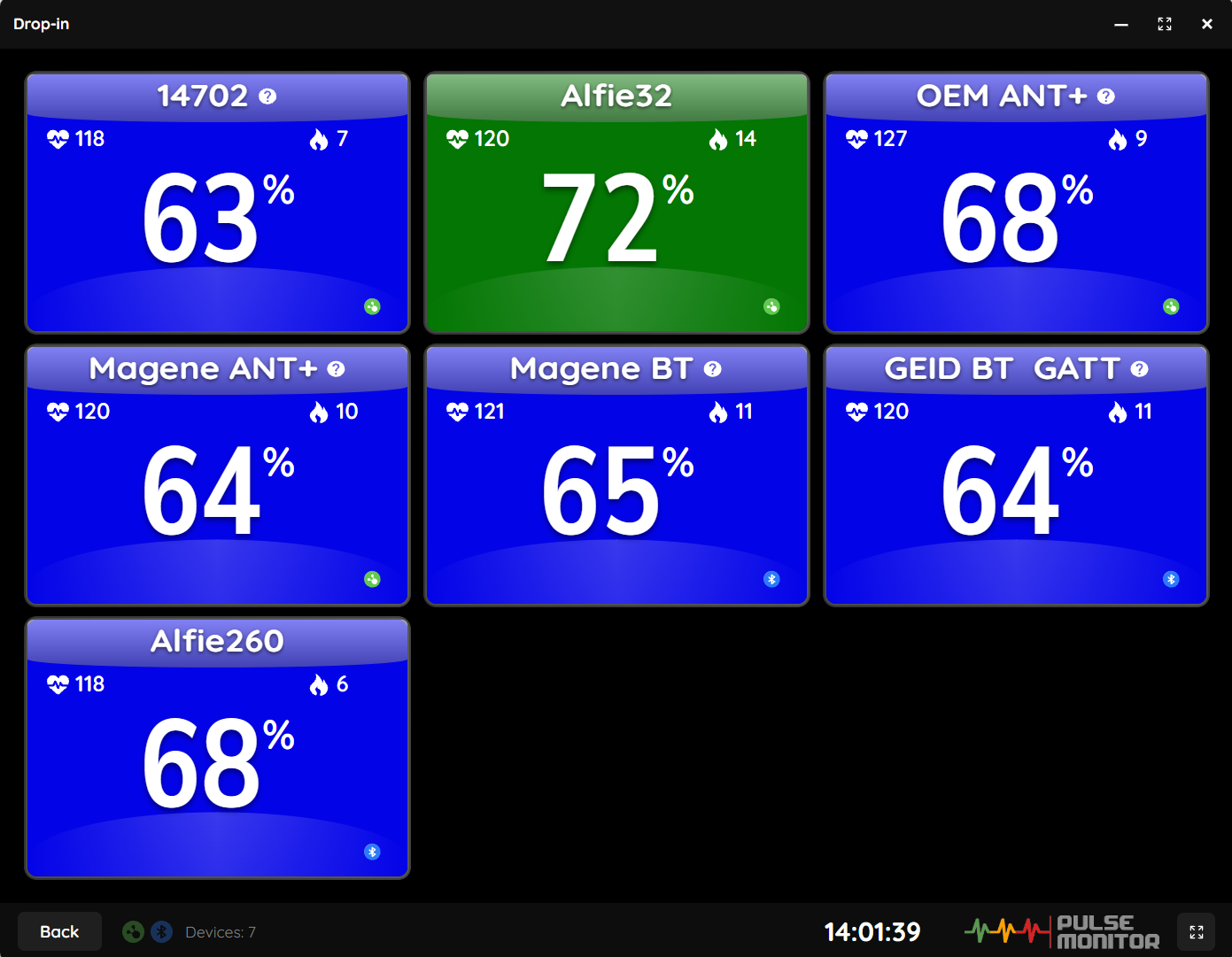
Each participant gets a box exactly like in a Classic training (Reading the participant box): the colour of the zone, the percentage, the heart rate and the calories.
The bottom bar shows:
| Element | Meaning |
|---|---|
| Back | Leaves the Drop-in screen. Because this screen often runs on a wall display, the program asks first: Do you want to exit the Drop-in view? |
| Pulsing ANT+ / Bluetooth icons | The receivers that are open |
| Devices: N | How many straps are currently on the screen |
| Clock | The current time of day (there is no training clock in Drop-in) |
| Full-screen button | Toggles full screen. Esc leaves full screen |
9.4 Who appears#
A participant appears at the first reading from their strap and disappears after 30 seconds of silence. If they return, they appear again as a new participant — the calories count from zero.
What the box shows depends on which strap it is:
| The strap is… | The box shows |
|---|---|
| The default device of a registered participant | The participant’s nickname and real data: their Max HR, age, weight and gender, so percentages and calories are accurate |
| Registered in Devices but nobody’s default device | The name of the strap and generic values (Max HR 185, age 25, weight 70 kg). A small ? is shown after the name |
| Not registered at all (ANT+ only) | The strap number with generic values and a ?. Shown only if you allowed it in Settings → Training → Allow unpaired ANT+ devices to join Drop-in sessions |
For the best Drop-in experience, register your straps, number them, and set each regular member’s strap as their default device. They will see their own nickname and correct percentage and calories, every time they pick up their strap.
9.4.1 Bluetooth in Drop-in#
A Bluetooth strap has to be registered first — Pulse Monitor connects only to straps it knows, because every connection occupies one of the limited Bluetooth slots, and it would be wasteful if a stranger’s strap took the slot. The Allow unpaired option concerns ANT+ only.
9.5 Limits#
- At most as many participants as your licence allows — in Free mode, two (Licence and registration). Anyone beyond that is ignored.
- At most the Max Bluetooth straps number of Bluetooth connections at the same time.
9.6 A wall display that runs all day#
Drop-in is designed to run without a trainer next to the screen:
- The computer stays awake while the screen is open (Block sleep and screen saver during training).
- When the room empties, the screen is simply empty; when someone enters, they appear.
- Leaving the screen is protected by a confirmation, so that a stray tap does not close it.
Place the ANT+ stick on a short extension cable in the middle of the room, and the computer or the display near the entrance, so that people see themselves as they walk in.